🖥️ New: Pocket now has a desktop app (Mac and Windows) – recording, structured summaries, mind maps, tasks and “Ask Pocket” right on your computer, synced with the device.
Looking for an honest Pocket AI review written by someone who actually uses the device every day? You’re in the right place.
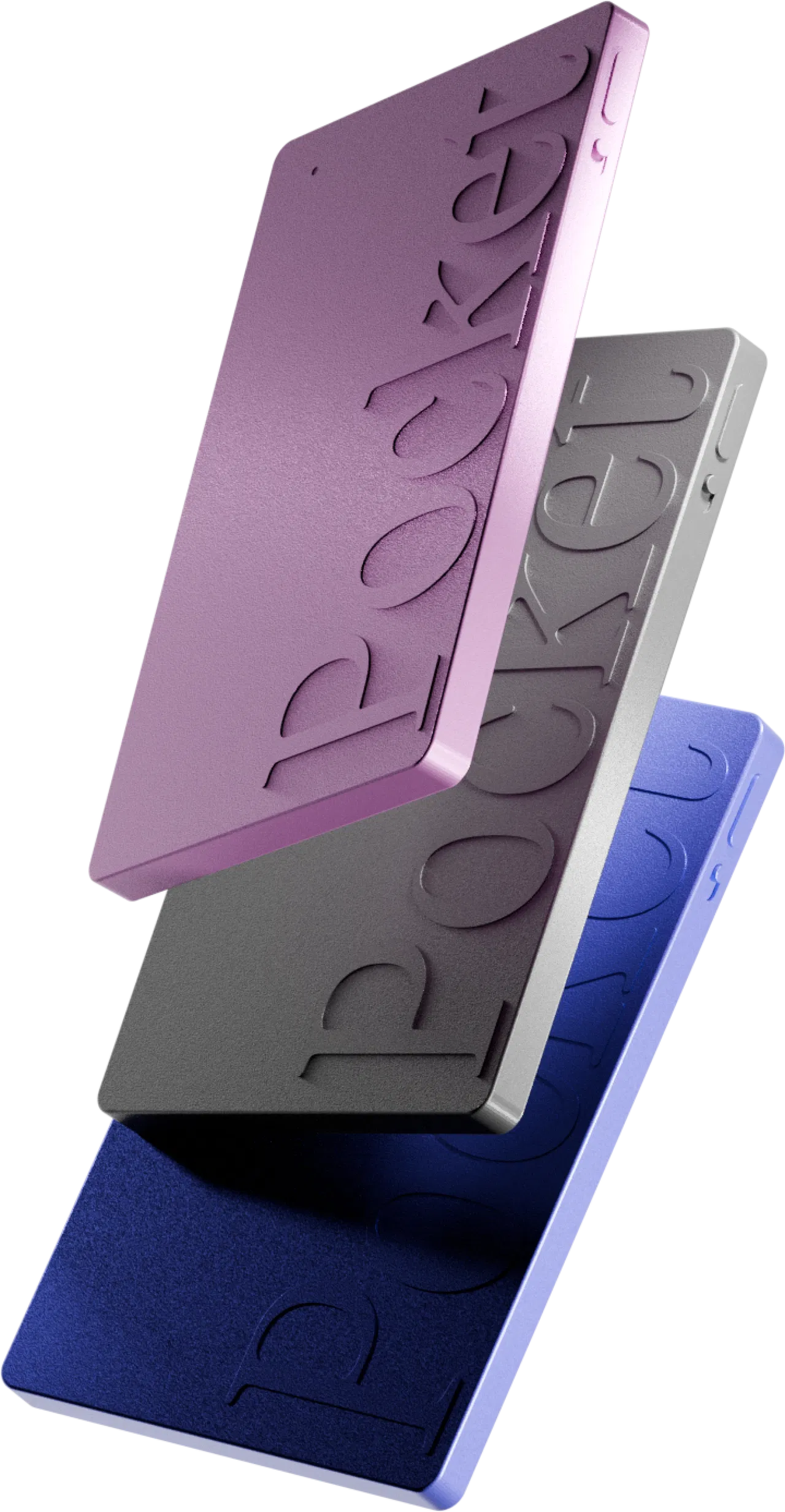 Pocket – AI Voice Recorder
The AI recorder that transcribes, summarizes and turns your conversations into tasks – no subscription.
Unlimited transcription
No subscription required
Summaries, tasks & mind maps
Up to -45% · limited offer
Order my Pocket →
Free shipping · 30-day money-back
Pocket – AI Voice Recorder
The AI recorder that transcribes, summarizes and turns your conversations into tasks – no subscription.
Unlimited transcription
No subscription required
Summaries, tasks & mind maps
Up to -45% · limited offer
Order my Pocket →
Free shipping · 30-day money-back
After a long hesitation between several AI-powered voice recorders, I bought Pocket, the little device made by heypocket, and I’ve been using it for several weeks – in meetings, on walks, on the phone and even for my personal notes.
In this complete Pocket AI review, I show you exactly what the device does, with real screenshots from my own use: the two recording modes, what it turns your conversations into (audio, transcription, summary, action plan, mind map…), its granular settings (right down to choosing the AI model ✨), its price – currently up to 45% off – and a head-to-head with Plaud. By the end, you’ll know whether this little companion deserves a place in your pocket.
✅ My verdict in one sentence: yes, Pocket is an excellent AI voice recorder – one of the very few to offer audio, transcription and summaries unlimited, with no subscription. After several weeks of use, I recommend it. I’ll explain everything in detail below. 👌
⚡ Deal on now: up to 45% off Pocket + no subscription required.
Pocket – AI Voice Recorder
The AI recorder that transcribes, summarizes and turns your conversations into tasks – no subscription.
Unlimited transcription
No subscription required
Summaries, tasks & mind maps
Up to -45% · limited offer
Order my Pocket →
Free shipping · 30-day money-back
My quick verdict on Pocket AI ⭐
For those in a hurry, here’s the gist of my Pocket AI review:
- Rating: 4.5/5 – one of the best AI recorders out there right now.
- Loved it: audio + transcription + summaries unlimited with no subscription, instant setup, two genuine recording modes, tasks and mind maps generated automatically, very fine-grained settings.
- Liked it less: poorly suited to video calls (Teams/Zoom), transcription sensitive to background noise, young brand.
- Price: $129 (up to 45% off right now), a one-time purchase, with no mandatory subscription.
What exactly is Pocket AI? 🤔
Pocket is a smart recording device about the size of a credit card (a bit thicker), designed in San Francisco by Open Vision Engineering. The brand describes it as a “personal AI assistant.” The principle: you press a button, you talk or let a conversation run, and the device records, transcribes, summarizes and organizes everything that was said.
The idea is clever: instead of being yet another app cluttering your phone, Pocket separates recording from the smartphone. It attaches magnetically to the back of your phone (MagSafe) and works without you having to unlock your screen or open an app. The result: you stay present in the conversation, and it’s a real difference in philosophy that you feel from the very first uses.
The brand claims more than 130,000 customers. Take that with a grain of salt – it’s the manufacturer – but Pocket has nailed its launch (a Y Combinator company, several million dollars raised). Now let’s see, in this Pocket AI review, how it actually works.
How does Pocket AI work? The 2 recording modes 🎙️
This is the part I really wanted to detail, because this is where Pocket stands out – and where you need to clearly understand what it does before buying.
It all starts with a single side button. One press: Pocket starts recording instantly, confirmed by a light indicator and a vibration. A second press: it stops. No screen, no menu. The device records locally (64 GB onboard), even without an internet connection, then syncs when you reopen the app. This offline capability is precious when travelling, on a plane or in an area with no signal: nothing is lost.
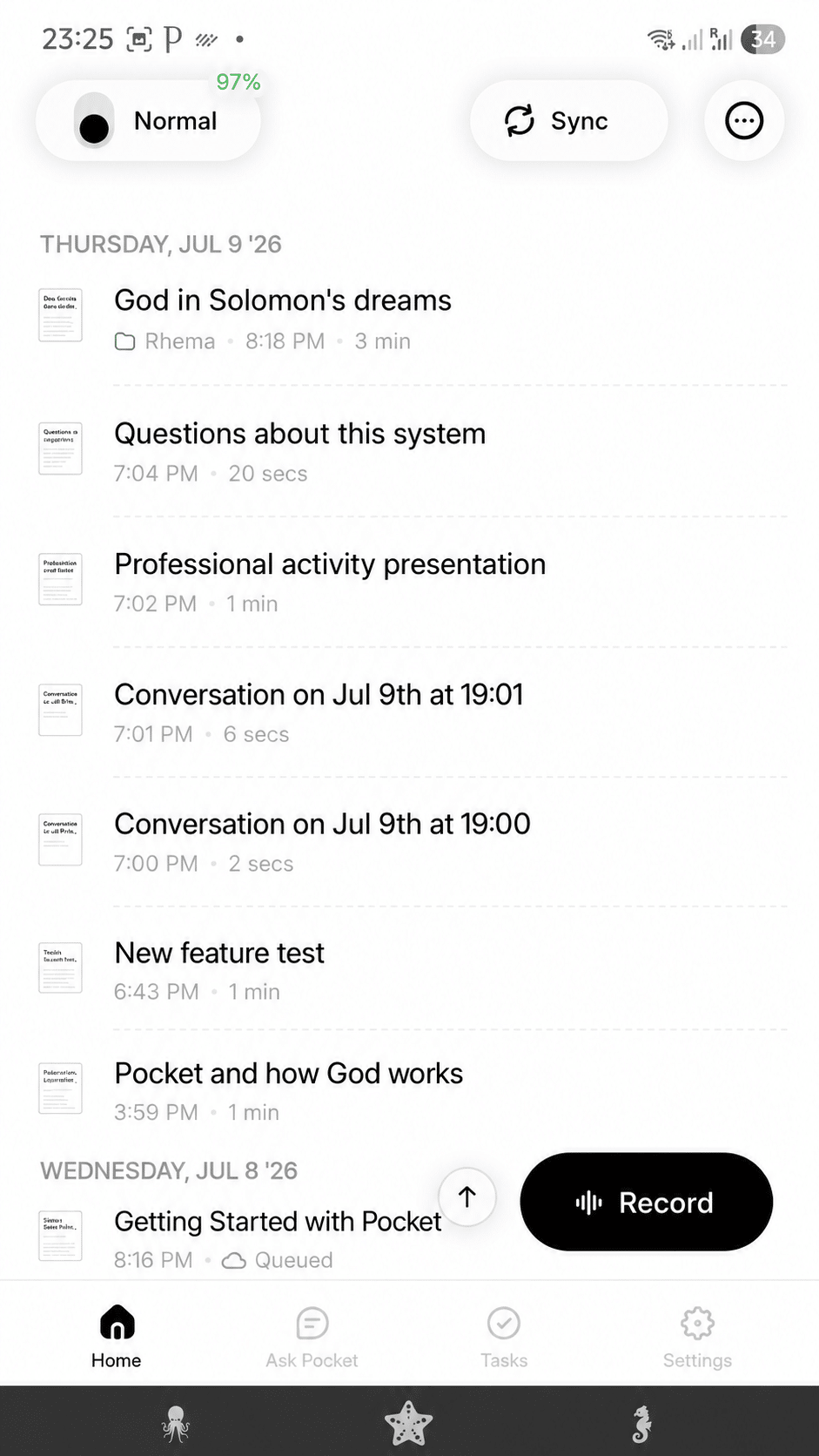
When you bring the device close, the app shows your Pocket’s status (battery, connection) and lets you choose between two modes:
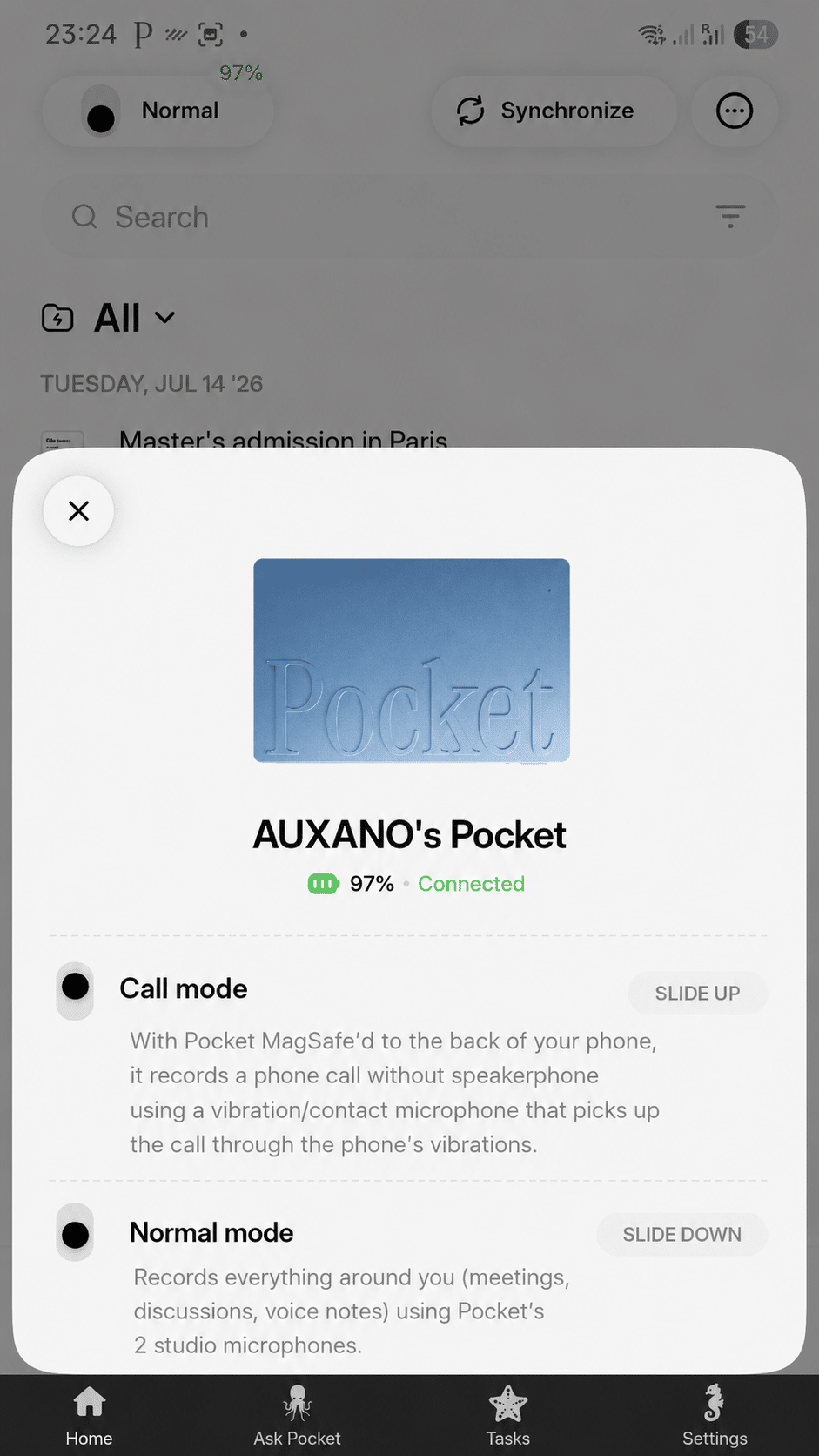
Normal mode: in-person conversations
This is the default mode. Pocket uses its 2 studio microphones to record everything around you – meetings, discussions, voice notes – with speaker separation and a stated range of up to 15 metres in a quiet environment. You place the device on the table, press, and take part as usual.
Call mode: phone calls
This is the cleverest feature. Pocket includes a 3rd microphone, a “contact” mic. Stuck to the back of your phone via MagSafe during a phone call, this mic captures both sides of the conversation through the phone’s vibrations, without going through the speaker. It’s completely discreet and, in my use, the accuracy blew me away.
⚠️ Good to understand: this mode is designed for cellular phone calls. For video calls through an app (Teams, Zoom, Google Meet), where the audio goes through the computer, Pocket is far less practical. If your main need is to summarize video calls, Pocket isn’t the ideal tool. For in-person meetings and phone calls, it excels.
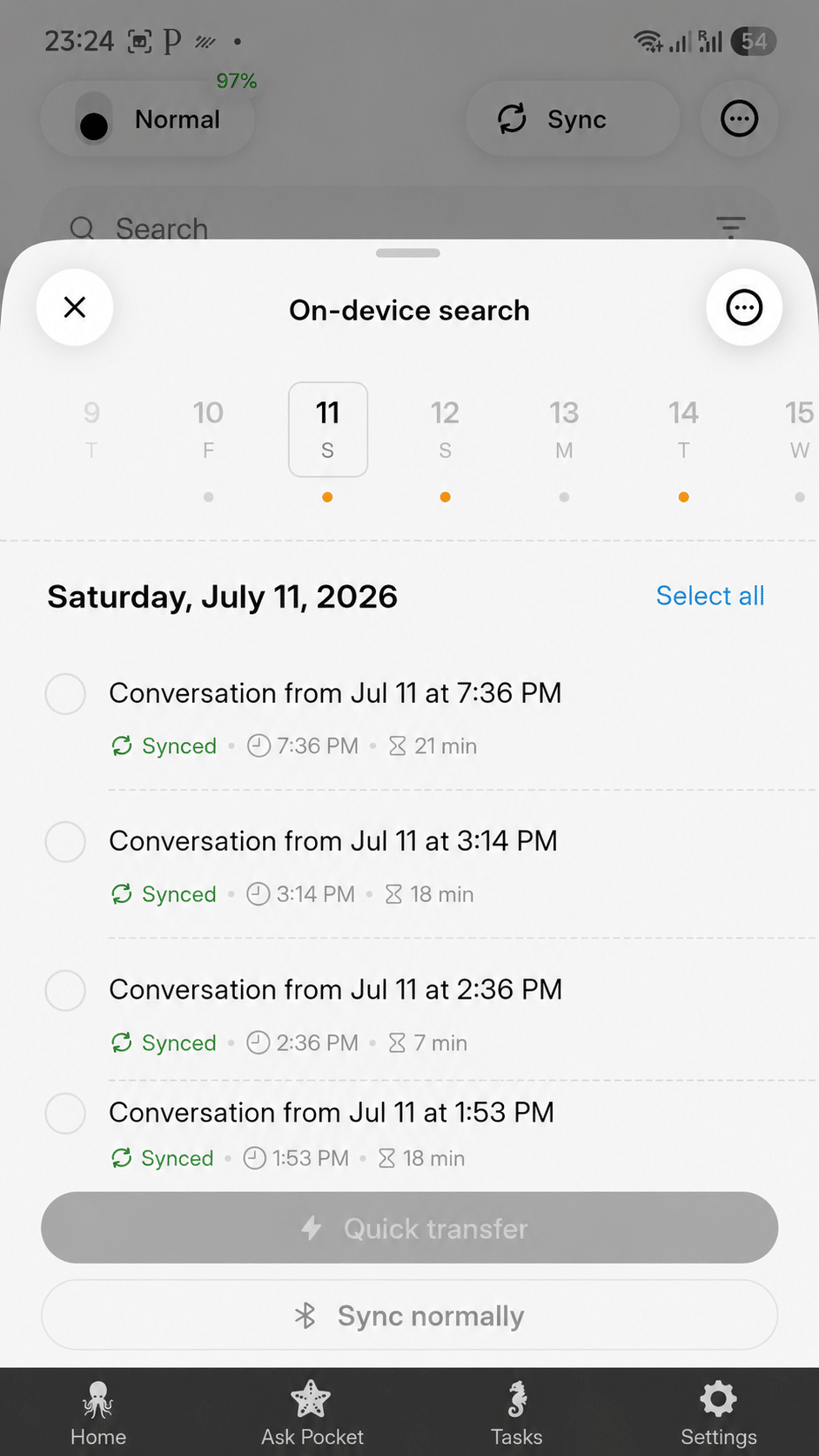
Syncing: fast transfer or normal
Once your recordings are captured, you transfer them to the app. Pocket offers a “Fast transfer” (over Wi-Fi, ideal for large volumes) or a normal sync (Bluetooth). Each conversation appears with its time and duration, and a “Synced” status. 👇
What Pocket does with your conversations (the real strength) 🧠
Here’s the heart of the product, and the reason I recommend it in this Pocket AI review. Once the recording is synced, a single conversation turns into five usable deliverables. Let’s go through them one by one, with my screenshots.
All your conversations are gathered in a clean home screen, sorted by date, with folders and tags (I keep my personal, work and spiritual notes separate, for instance). The “Record” button stays accessible at the bottom to start a capture directly from the phone.
1. The audio file + the transcription 🎧
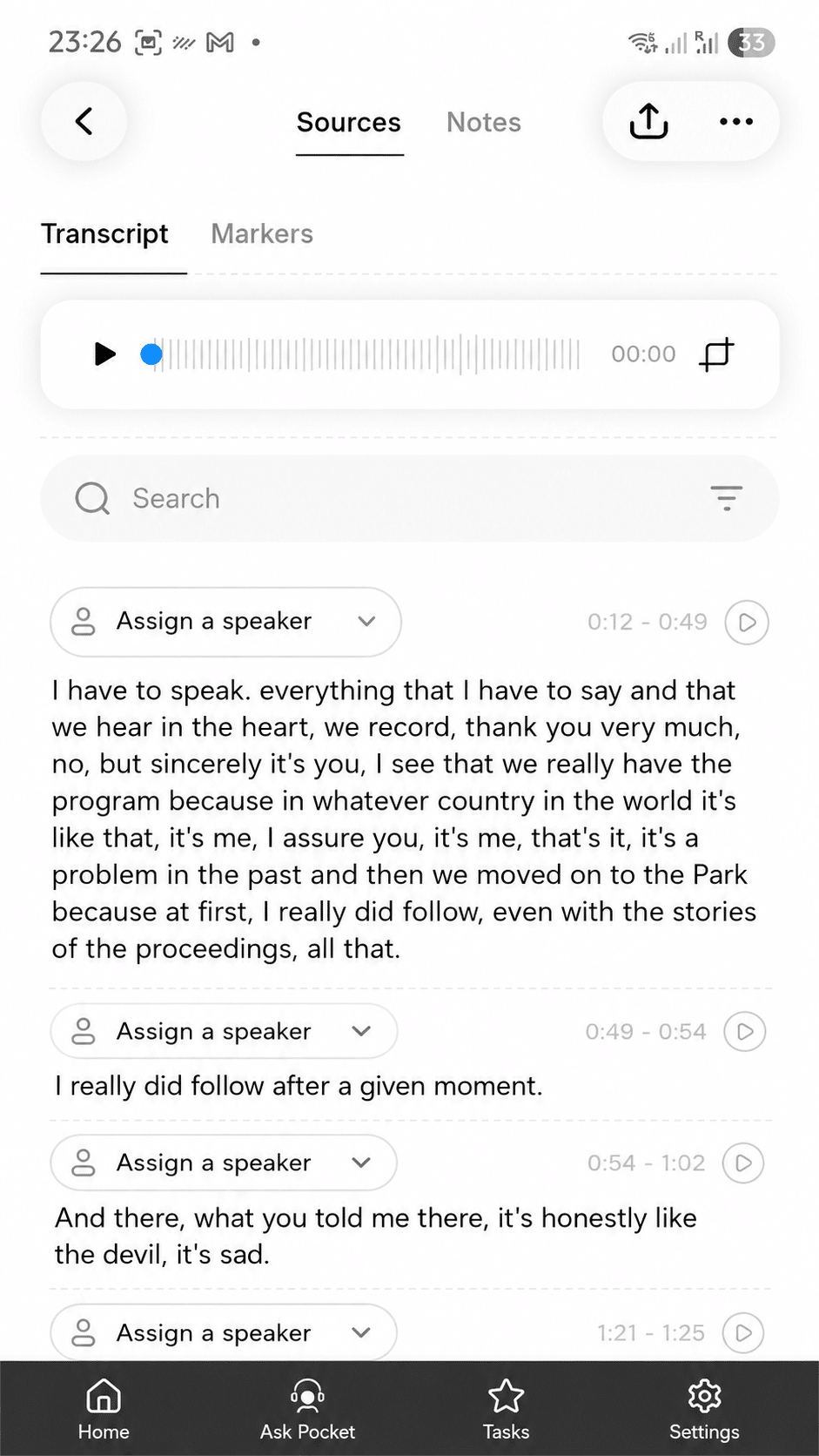
First, Pocket keeps the audio: you can replay the recording in a built-in player (with a waveform) and retrieve the file. In parallel, the AI generates a full transcription, timestamped, searchable, and split by speaker turn. You can assign a name to each speaker, search for a specific word, and replay an exact passage. It’s perfect for finding “who said what” without listening again.
2. The summary ✍️
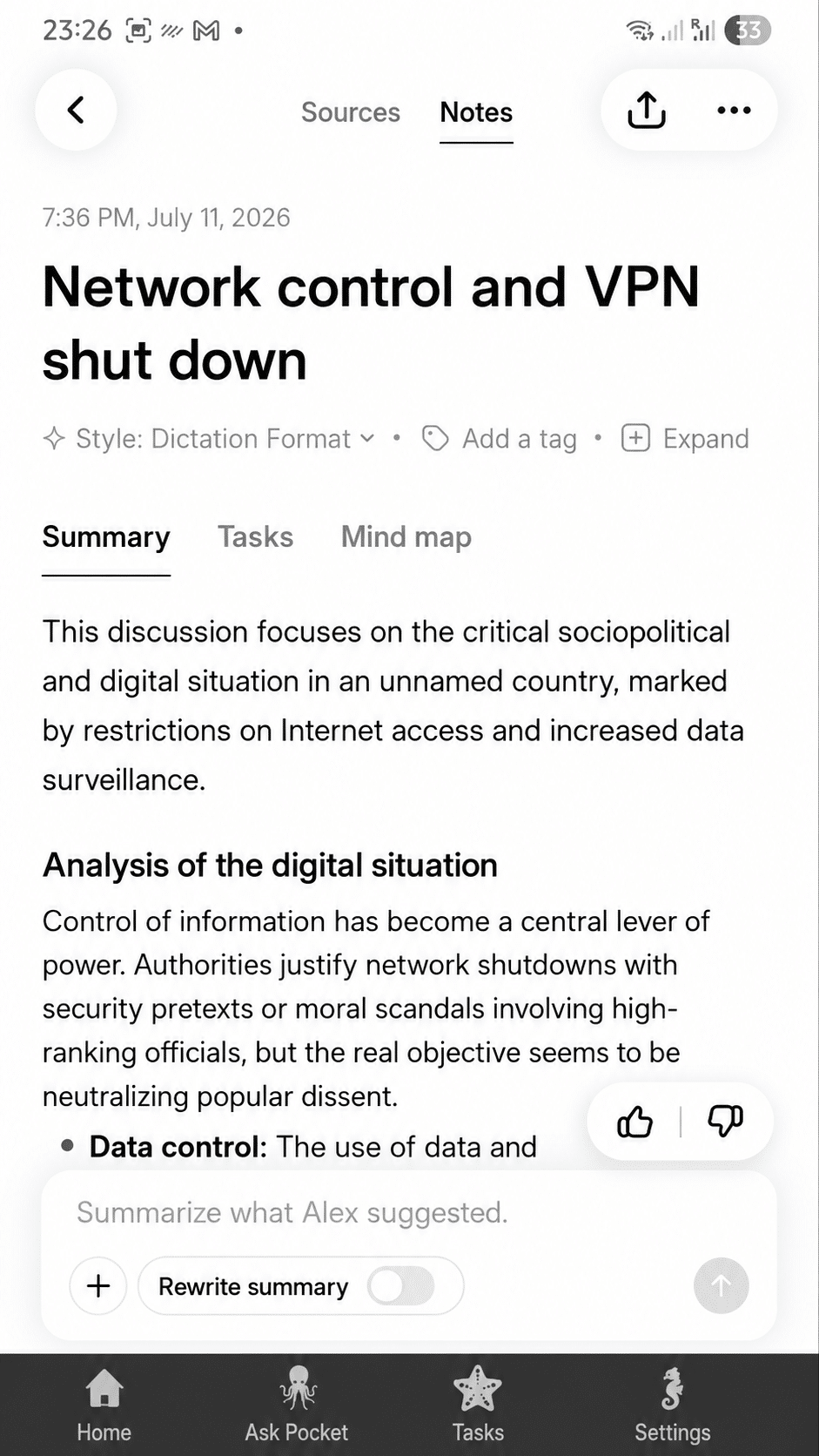
Next, Pocket produces a clear summary: the key points in seconds, structured with headings and bullet points. No more re-reading pages of transcript – you get the synthesis directly. And if the summary doesn’t suit you, you can regenerate or rewrite it with the AI, change the style, adjust the tone.
3. The action plan (tasks) ✅
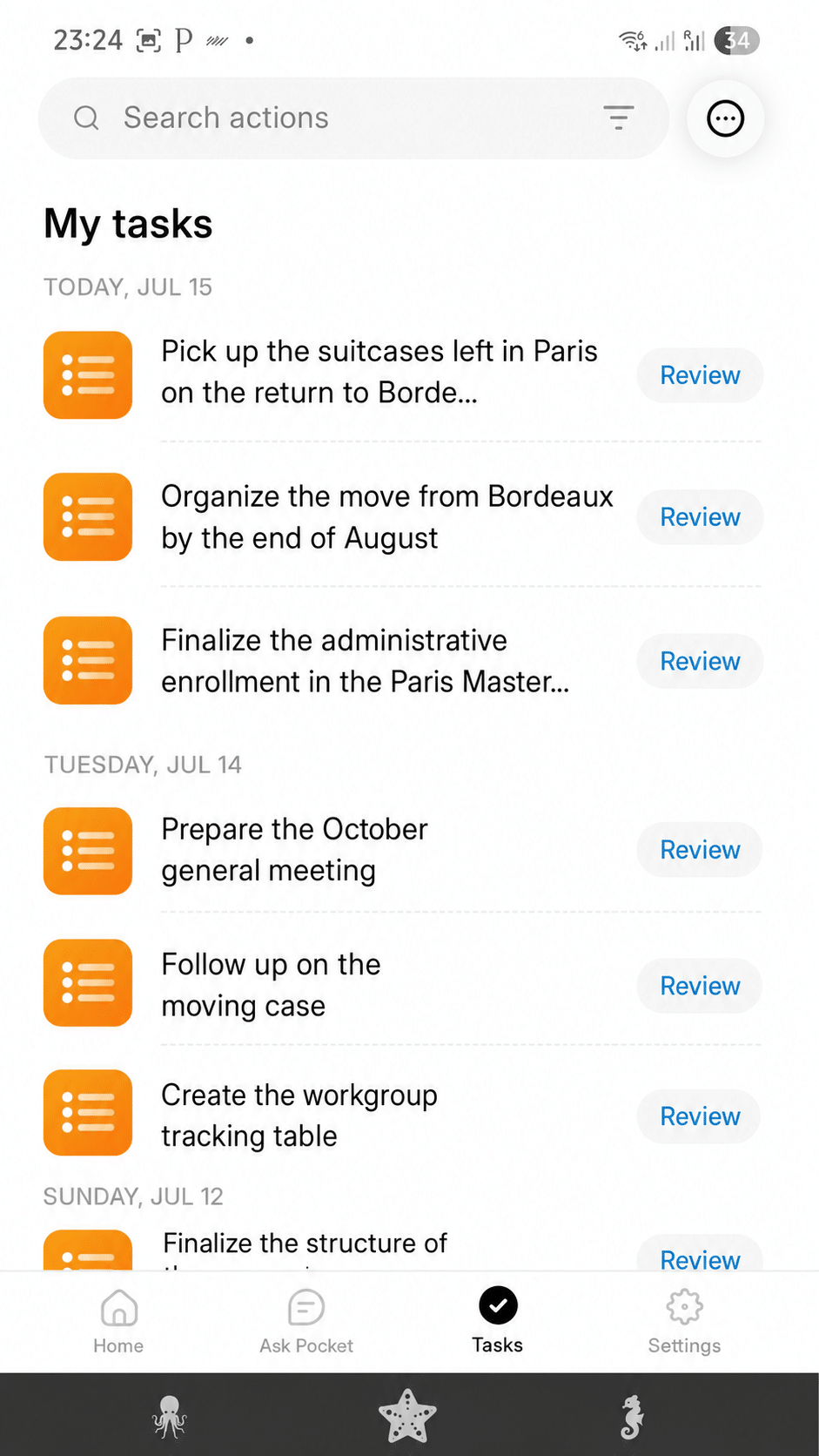
This is my favourite feature. Pocket automatically extracts the tasks mentioned in your conversations and gathers them in a “My tasks” tab. In practice, after a discussion, I find my to-dos already listed – [for example, in my case: “organize the move”, “finalize a registration”, “prepare a meeting”…]. Each task can be reviewed and tracked. Nothing gets lost between two conversations anymore.
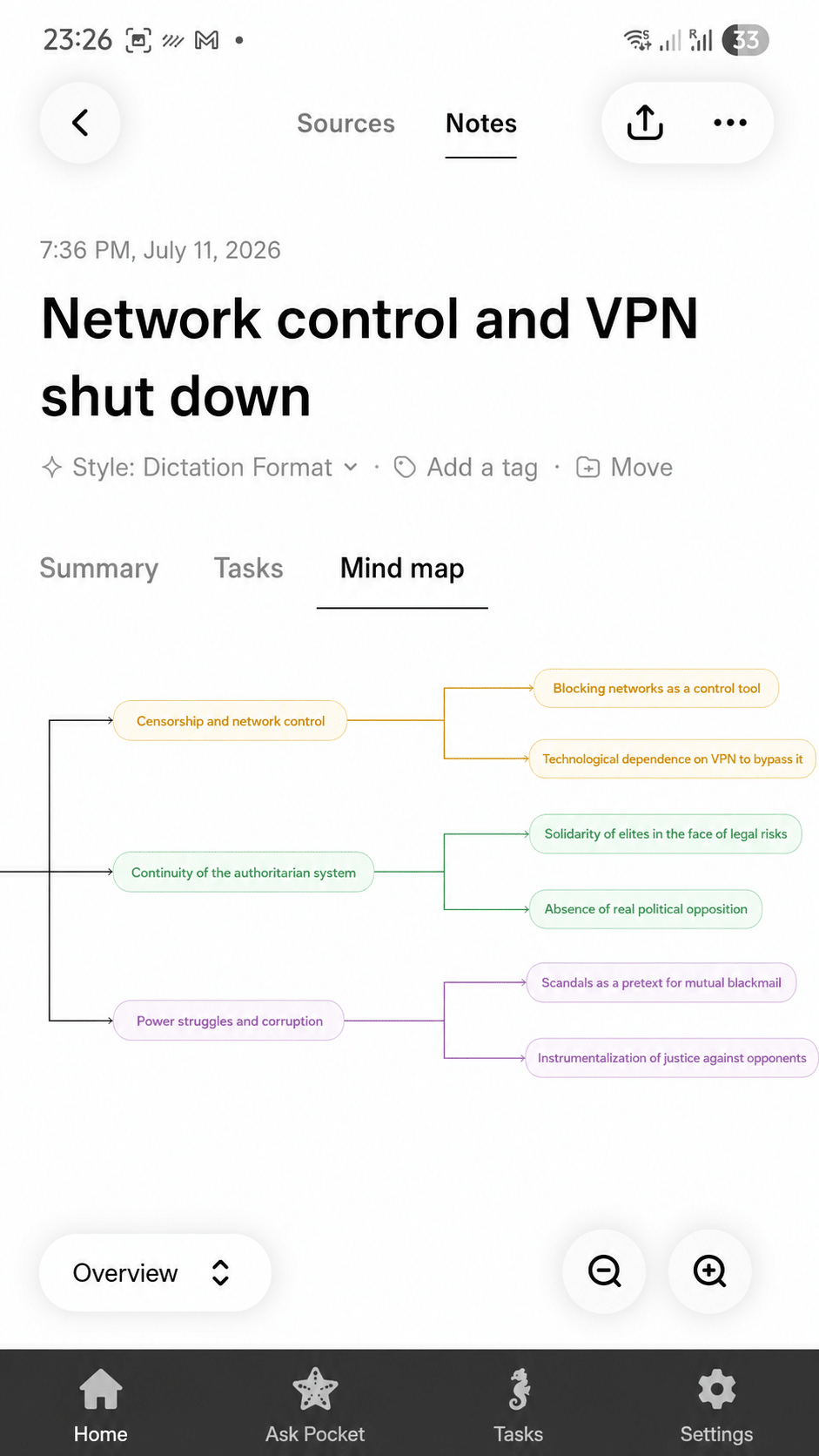
4. The mind map 🗺️
For complex conversations, Pocket generates a mind map: the discussion broken down into themes and sub-branches. It’s a great way to grasp at a glance the structure of an exchange, the priorities and the links between ideas – far more telling than a wall of text.
5. Ask Pocket: query all your conversations 💬
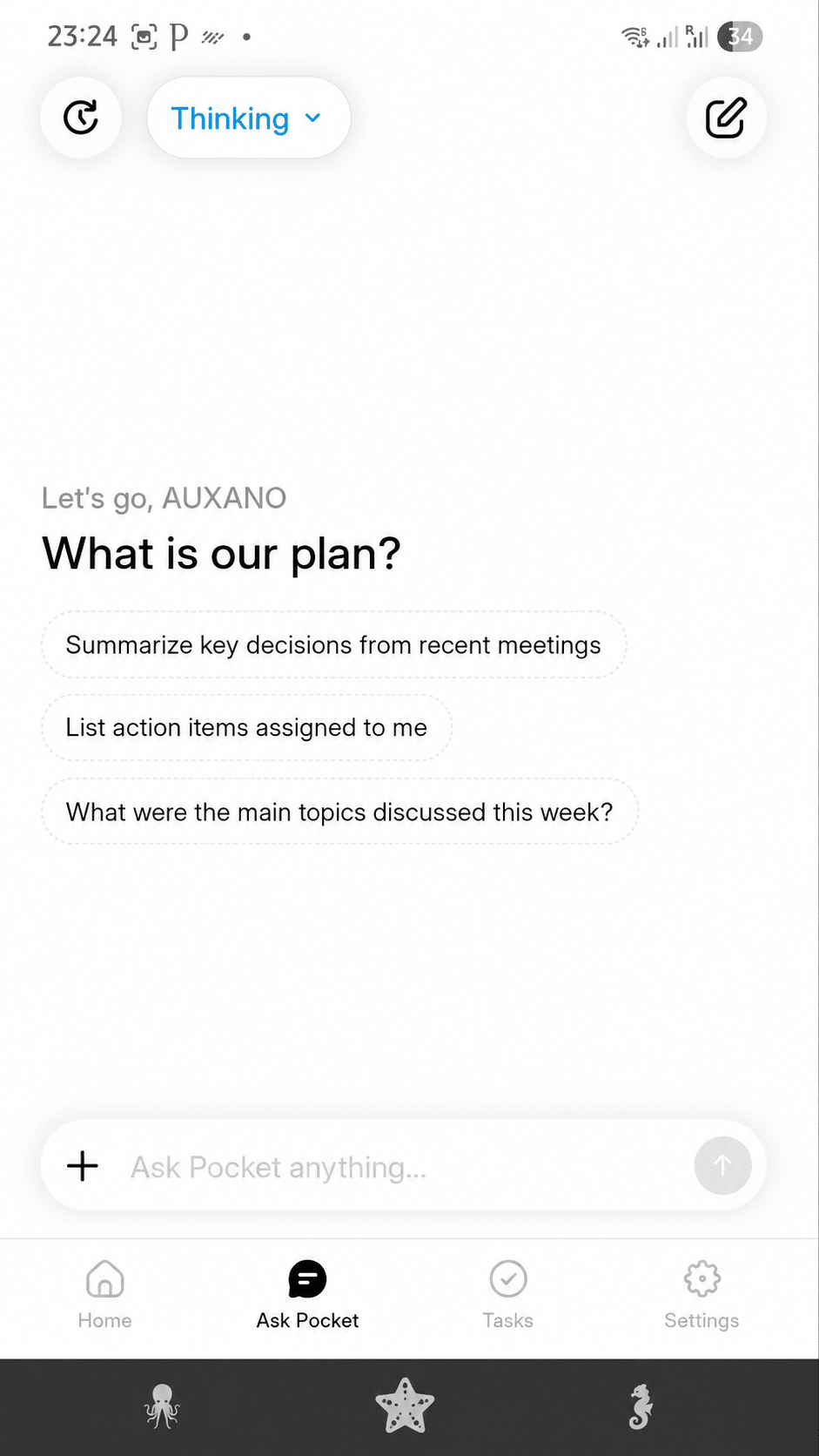
Finally, “Ask Pocket” lets you ask a question in natural language across all your conversations: “Summarize the key decisions from recent meetings”, “List the action items assigned to me”, “What were the main topics this week?”. The AI goes and finds the answer in your memory, without you having to dig. It’s a bit like a search engine over your own professional life.
 Pocket – AI Voice Recorder
The AI recorder that transcribes, summarizes and turns your conversations into tasks – no subscription.
Unlimited transcription
No subscription required
Summaries, tasks & mind maps
Up to -45% · limited offer
Order my Pocket →
Free shipping · 30-day money-back
Pocket – AI Voice Recorder
The AI recorder that transcribes, summarizes and turns your conversations into tasks – no subscription.
Unlimited transcription
No subscription required
Summaries, tasks & mind maps
Up to -45% · limited offer
Order my Pocket →
Free shipping · 30-day money-back
A rare level of customization ⚙️
This is something few Pocket AI reviews cover, and yet it’s decisive in daily use: the granularity of the settings is impressive. You don’t put up with the AI, you steer it.
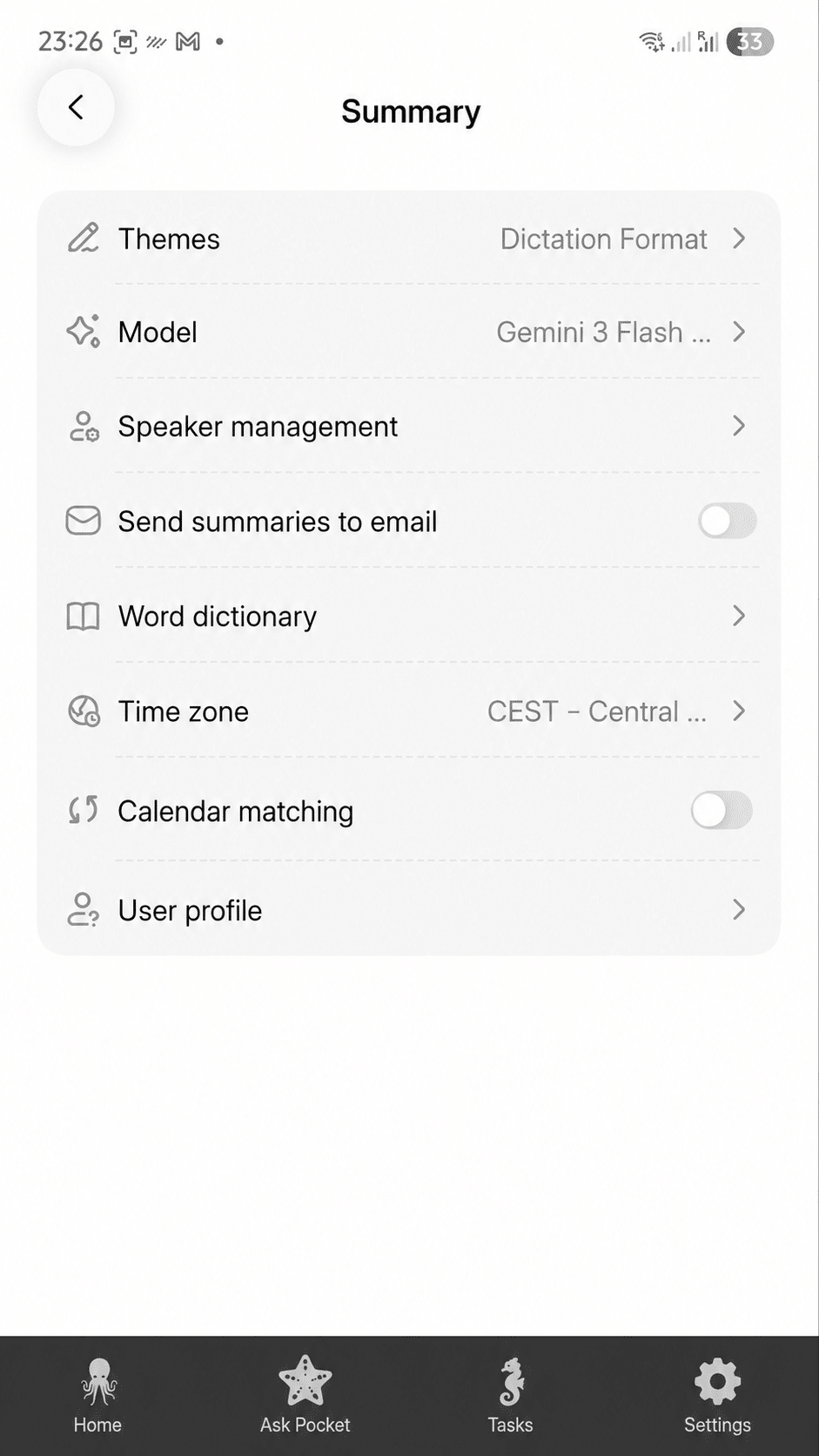
You choose the AI model. 🤯 That’s rare: Pocket lets you select which model generates your summaries (for example Gemini 3 Flash, but also other models depending on updates – GPT-5, Claude…). So you can trade speed against depth of analysis depending on your needs.
You choose the summary style. Through the “Themes” (for example the “Dictation Format”), you define how the information is structured. The Pro version unlocks more than 100 styles.
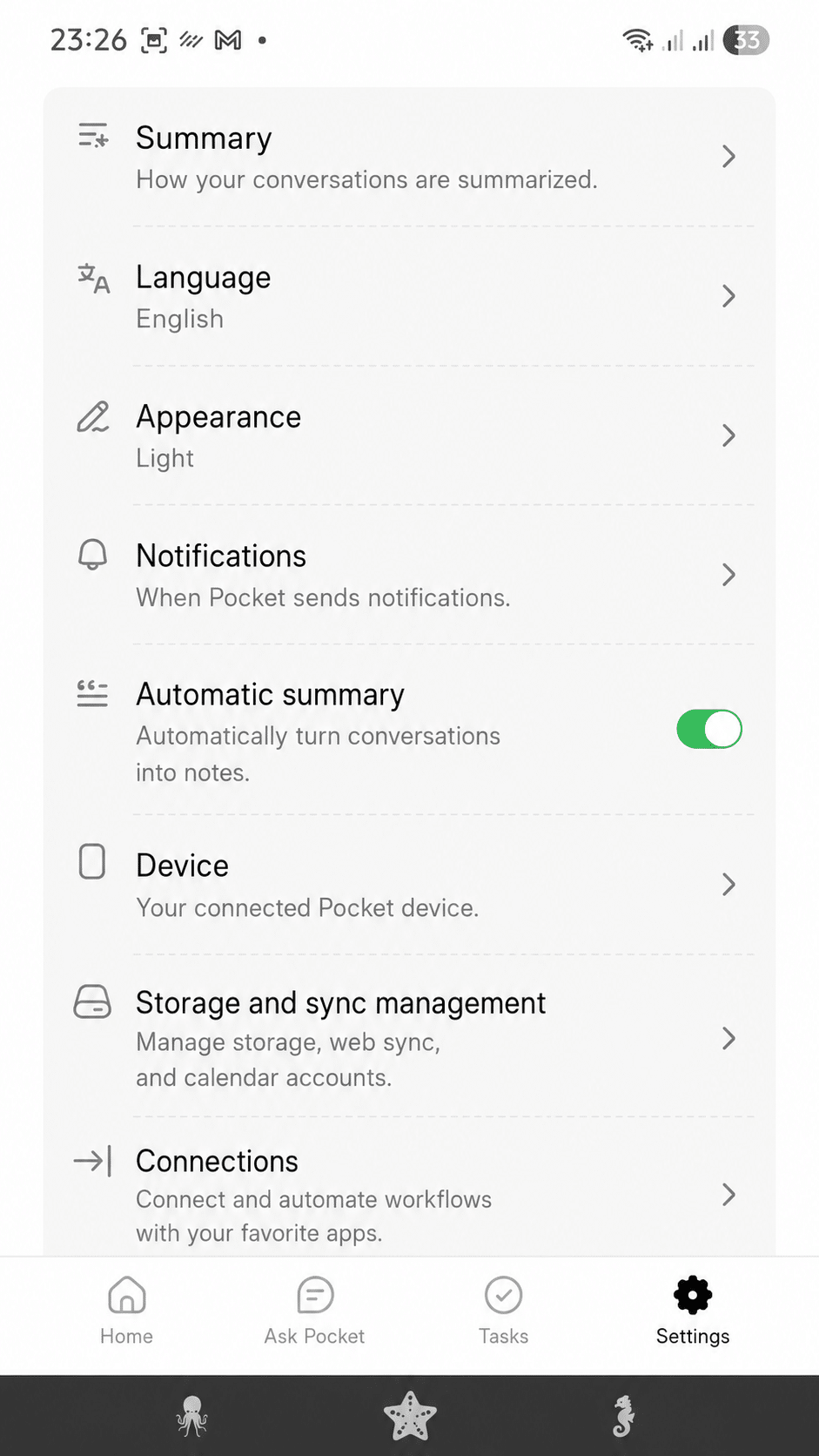
You can email the summaries – automatically. 📧 A “Send summaries to email” option lets you receive your syntheses in your inbox. Combined with “Auto-summary” (which automatically turns each conversation into a note), you get a fully hands-free flow: you talk, and your summary lands in your inbox without you doing a thing.
And even more settings: a word dictionary (for jargon or proper nouns that get mis-transcribed), speaker management, calendar matching (to link your recordings to your appointments), the time zone, the app language (English included), and connections / workflows to automate to your other apps.
This depth of configuration is what turns Pocket from a simple voice recorder into a genuine customizable assistant. Few competitors go this far, and it’s a strong point of this Pocket AI review.
My daily experience 📱
What struck me from day one is the simplicity: app downloaded, device paired in under a minute, and off you go. The real click moment came in a meeting: before, I’d scribble notes and miss half the exchange; now I take part fully and walk out with everything already organized – transcription, summary and tasks included.
But I also use it a lot for my personal notes: an idea that pops up while walking, a thought I don’t want to forget, an important conversation. Pocket captures, files and hands me back the essentials. Where the device shows its limits is in very noisy environments (a crowded café, a busy street), where the transcription degrades – like any microphone. Nothing dealbreaking, but it’s only fair to say so.
I also carry it around all the time, especially since it manages to stay put on the back of my smartphone. On that point, it’s true that Heypocket includes a MagSafe adapter in the box, but I personally ordered a magnetic sleeve for my phone and it sticks to it perfectly. Having gone for the blue colour, I find it suits me really well!
Concrete use cases: how I really use it 🧩
To make this Pocket AI review useful, here are the situations where the device genuinely changed the way I work, beyond the theory:
In work meetings. This is the number-one use. I put Pocket on the table, press, and take part stress-free. On the way out, I have the minutes, the decisions and the assigned tasks. Gone is the awkward moment when someone asks “did anyone take notes?”. I’ve even stopped writing my minutes by hand: I re-read the summary, tweak a couple of words, and send it. The time saved runs into hours every week.
During an important phone call. Thanks to call mode, I capture the key exchanges – an administrative appointment, a negotiation, a complex instruction – and I later find the exact transcript. No more calling back to check “the exact figure we agreed on”. Be mindful, though, of the other party’s consent, which remains mandatory.
For my personal notes, while walking. This is the use I hadn’t anticipated and that I love. An idea that surfaces on a walk, a thought not to be lost: I press and talk, Pocket files and structures it. My thoughts no longer evaporate. This is where the “no screen, no app to open” format really makes sense.
In a student or training context. A lecture, an interview, a conference: Pocket transcribes everything and hands me a digestible summary, plus a mind map to revise. For anyone studying or training, it’s a formidable ally.
In all these cases, the through-line is the same: I stay present, and I let Pocket turn speech into usable information. That’s exactly the brand’s promise – and, in my Pocket AI review, it’s delivered.
Tech specs and colours 🎨
- Microphones: 2 studio mics + 1 contact mic (captures calls without the speaker).
- Attachment: MagSafe (adhesive patch included for non-compatible phones).
- Battery: up to 4 days of active use, full charge in 1.5 h via USB-C.
- Storage: 64 GB onboard + unlimited cloud.
- Range: up to 15 metres.
- Connectivity: Bluetooth (BLE), Wi-Fi, USB-C.
- Weight and size: 52 g, about 8.6 × 5.6 × 0.5 cm – genuinely discreet.
- Compatibility: iOS and Android, plus a web app and Mac/Windows apps.
- Available colours: white, space grey, pink, blue (and green depending on stock). The finish is polished across all models.
Price, the up-to-45%-off deal and subscriptions 💸
Let’s talk money, because that’s the point that clinched my decision in this Pocket AI review.
Pocket sells for $129 (crossed-out price $199), with a discount of up to 45% right now – a good time to buy. But above all: no mandatory subscription. The core features – audio, transcription, summaries and unlimited mind maps – are free for life.
That’s rare in this category, where most competitors lock you into a monthly subscription to unlock the AI. An optional Pocket Pro plan exists, but – I’ll say it clearly – you don’t need it to start, and the free plan is more than enough for normal use.
Pocket subscription comparison table
| Plan | Price | What you get | For whom |
|---|---|---|---|
| Free | $0 (for life) | Audio, unlimited transcription (standard accuracy), unlimited summaries (kept 30 days), mind maps, tasks & integrations, Ask Pocket (2 msgs/day), text export | Most users – more than enough |
| Pro | $16.59/mo ($199/yr, -17%) or $19.99/mo | Everything in Free + summaries kept for life, highest-accuracy transcription, auto speaker detection, unlimited Ask Pocket, advanced AI models, 100+ summary styles, bulk export, unlimited cloud history | High volume, intensive pro use |
| Enterprise | Custom quote | Everything in Pro + SAML SSO, BAA compliance, admin controls, workflows & webhooks, priority support | Teams and companies |
My advice: start with the free plan. You have audio, transcription and unlimited summaries, which covers the essentials. You’ll move to Pro only if you need maximum accuracy or unlimited cloud history. In other words, here the subscription is a bonus, not an obligation – and that changes everything over time.
Pocket – AI Voice Recorder
The AI recorder that transcribes, summarizes and turns your conversations into tasks – no subscription.
Unlimited transcription
No subscription required
Summaries, tasks & mind maps
Up to -45% · limited offer
Order my Pocket →
Free shipping · 30-day money-back
Security and privacy 🔒
A device that captures your conversations inevitably raises the privacy question. On this point, Pocket ticks the right boxes: end-to-end encryption, HIPAA compliance, data stored on the device or on US servers, and the commitment that it’s never sold or shared. Even if you lose the device, your recordings stay in your cloud, accessible only from your account.
A common-sense reminder: recording a conversation, especially a call, requires the other party’s consent. The law is strict about this. Pocket provides the tool; it’s up to you to use it responsibly.
Pocket vs Plaud: the comparison ⚔️
This is the unavoidable comparison in any serious Pocket AI review. Plaud (Note, NotePin, Note Pro models) is the historical leader and the direct competitor. I seriously considered the Plaud Note Pro before choosing Pocket. Here’s the head-to-head.
| Criterion | Plaud (Note Pro) | |
|---|---|---|
| Device price | $129 (up to 45% off) | ~$189 |
| Subscription for the AI | ❌ Not required (free unlimited) | ✅ Required for unlimited |
| Free plan | Audio + transcription + unlimited summaries | Capped at 300 min/month |
| Subscription cost | $0 (optional Pro from $16.59/mo) | $99.99/yr (Pro) to $239.99/yr (Unlimited) |
| Microphones | 2 studio + 1 contact (calls) | In-person + calls |
| AI features | Summaries, tasks, mind maps, Ask Pocket, model choice, auto email | Summaries, tasks, transcription |
| Languages | 120+ | 100+ |
| Battery life | 4 days | Varies by model |
| Brand maturity | Young | Established since 2023 |
My comparison verdict: both devices do broadly the same job, and Plaud remains excellent with a very mature app. But over time, Plaud’s “device + subscription” model gets expensive, whereas Pocket offers unlimited with no subscription and deeper customization (model choice, automatic email). If you record regularly and don’t want a monthly cost that keeps climbing, Pocket is the more rational choice. That’s what tipped the balance for me.
Customer reviews: what people really say about Pocket AI 🗣️
Beyond my own Pocket AI review, I dug into customer feedback to give you a balanced picture.
On Trustpilot, Pocket shows a 4.7/5 “Excellent” rating from over 1,830 reviews – that’s solid. The summary highlights a “massively positive” experience: customers find the device effective and near-indispensable for capturing and organizing their conversations, with a real productivity gain. The most-cited points: ease of use, accuracy of the summaries and the ability to extract key points. On the official site, the rating climbs to 4.9/5 (576 reviews, 90% 5-star) – manufacturer figures, to be taken with caution.
What comes up in the positive reviews:
- “Surprisingly accurate transcription, even for a phone call.”
- “Setup in under a minute, worked first time.”
- “I can finally be fully present in a meeting without taking notes.”
- “The summaries are clear and to the point, I find everything without listening again.”
- “Long battery life, minimalist design, feels like a tool built for pros.”
The main criticism (worth knowing before buying): one user explains in detail that Pocket is poorly suited to virtual meetings (Teams, Zoom, RingCentral). Since the device is designed for in-person meetings and phone calls, using it for a computer-based video call is a hassle. That’s exactly the limit I pointed out: buy Pocket for in-person meetings and phone calls, not to summarize video calls.
In short, customer reviews confirm my feeling: an excellent device for the vast majority of uses, provided you clearly understand what it’s built for.
Pros and cons ⚖️
What I loved:
- Retrievable audio + transcription + unlimited summaries with no subscription.
- Two genuine recording modes (in-person and calls).
- Tasks and mind maps generated automatically.
- AI model choice and emailing of summaries (manual or automatic).
- Instant setup, 4-day battery, ultra-discreet format (52 g).
- Serious privacy (encryption, HIPAA compliance).
- Attractive price, especially with the up-to-45%-off deal.
What might hold you back:
- Poorly suited to video calls (Teams/Zoom) – it’s an in-person and phone-call tool.
- Transcription degraded in very noisy environments.
- Young brand: ecosystem and support still maturing.
- You need a smartphone nearby to sync.
Who is Pocket AI for? 🎯
From my experience, Pocket is aimed first at professionals who juggle in-person meetings, appointments and phone calls: consultants, sales reps, real-estate agents, therapists, doctors, journalists, entrepreneurs. It will also suit students (lectures, interviews) and anyone who likes to capture ideas on the fly.
On the other hand, if your main need is to summarize video calls, go for a software meeting assistant instead. And if you only record occasionally, your phone’s voice-recorder app may be enough: Pocket’s value shows with regular use.
FAQ – Pocket AI review ❓
Does Pocket work in my language?
Yes, the transcription handles more than 120 languages and dialects, and the app is available in several languages.
Can you retrieve the audio files?
Yes. Pocket keeps the audio, which you can replay in the app and export, on top of the transcription.
Does Pocket email summaries?
Yes, an option lets you email the summaries, and even automatically thanks to “Auto-summary”.
Can you choose the AI model?
Yes, Pocket lets you select the model that generates your summaries (Gemini, GPT, Claude depending on updates).
Do you need a subscription?
No. Audio, transcription, summaries and mind maps are free and unlimited. The Pro plan is optional and not needed to start.
Does Pocket record Zoom or Teams calls?
Not ideally. It’s designed for in-person meetings and standard phone calls.
What’s the difference with Plaud?
Mainly the business model: Pocket offers unlimited with no subscription where Plaud caps the free plan at 300 min/month.
How much does Pocket cost?
$129 (up to 45% off right now), a one-time purchase, with no mandatory subscription.
My final verdict on Pocket AI 🏁
After several weeks of use, my Pocket AI review is very positive. It’s a device that delivers on its promise: it saves me precious time, lets me be truly present in my conversations, and turns every exchange into replayable audio, transcription, summary, action plan and mind map – all effortlessly. Its real strength, beyond the technical quality, is the combo of no subscription + fine customization (model choice, automatic email summaries) that makes it clearly more attractive than Plaud over time.
No product is perfect: the brand is young, background noise remains its Achilles’ heel, and it’s not built for video calls. But for a one-time $129 – up to 45% off right now – with unlimited lifetime transcription, Pocket offers, in my opinion, the best value for money in the AI-recorder category today.
If you were hesitating, it’s an investment I recommend, especially since it’s covered by a one-year warranty and a 30-day return window to try it risk-free. 👇
🔥 Grab the up-to-45%-off deal + no subscription required.
Pocket – AI Voice Recorder
The AI recorder that transcribes, summarizes and turns your conversations into tasks – no subscription.
Unlimited transcription
No subscription required
Summaries, tasks & mind maps
Up to -45% · limited offer
Order my Pocket →
Free shipping · 30-day money-back
This Pocket AI review reflects my personal experience. It may contain affiliate links: if you buy through these links, I may earn a commission at no extra cost to you. It does not influence my opinion.
Pocket IA Avis · Pocket AI Review · Pocket AI Test · Pocket AI Recensione · Pocket AI Opiniones · Pocket AI Review